Model Card for LimaRP-Llama2-v2 (Alpaca)
LimaRP-Llama2-v2 (Alpaca) is an experimental Llama2 finetune narrowly
focused on novel-style roleplay chatting. There are two main differences compared to the previously
released LimaRP-Llama2: a larger number of training tokens
(+75%) summarized with a separately-trained model (instead of gpt-4) and Alpaca instruction sequence
format (### Instruction: / ### Input: / ### Response: ). The additional training examples have been
originally designed for 8k context size, so their usage with the original Llama2 (instead of LLongMA-2) is
not optimal.
To facilitate uploading and distribution, LoRA adapters have been provided instead of the merged models. You should get the Llama2 base model first, either from Meta or from one of the reuploads on HuggingFace (for example here and here). It is also possible to apply the LoRAs on different Llama2-based models as many other authors have done with the previously released version.
Note that preliminary testing has shown that applying Alpaca-formatted LimaRP on Alpaca-type instruct models may result in somewhat less verbose responses from the AI, compared to the same data using the original LimaRP format.
Dataset updates may be posted in the future.
Thanks to Chub AI for providing the compute for fine-tuning the 70B version.
Model Details
Below follows information mostly copy-pasted from previous releases.
Model Description
This is an experimental attempt at creating an RP-oriented fine-tune using a manually-curated, high-quality dataset of human-generated conversations. The main rationale for this are the observations from Zhou et al.. The authors suggested that just 1000-2000 carefully curated training examples may yield high quality output for assistant-type chatbots. This is in contrast with the commonly employed strategy where a very large number of training examples (tens of thousands to even millions) of widely varying quality are used.
For LimaRP a similar approach was used, with the difference that the conversational data is almost entirely human-generated. Every training example is manually compiled and selected to comply with subjective quality parameters, with virtually no chance for OpenAI-style alignment responses to come up.
Uses
<!-- Address questions around how the model is intended to be used, including the foreseeable users of the model and those affected by the model. -->
The model is intended to approximate the experience of 1-on-1 roleplay as observed on many Internet forums dedicated on roleplaying. It must be used with a specific format similar to that of this template:
### Instruction:
Character's Persona: {bot character description}

User's Persona: {user character description}

Scenario: {what happens in the story}

Play the role of Character. You must engage in a roleplaying chat with User below this line. Do not write dialogues and narration for User. Character should respond with messages of medium length.

### Input:
User: {utterance}

### Response:
Character: {utterance}
With ### Instruction:, ### Input: and ### Response: being special instruct-mode sequences (same as
Alpaca). The text under curly braces (curly braces included; do not include them in the prompt) must be replaced
with appropriate text in natural language or plaintext. Replace User and Character with actual character names.
To further clarify,
### Instruction:is intended to contain character personas (human and AI) and scenario information### Input:is intended to contain user / human utterances### Response:is intended to contain bot / AI utterances
<!-- This more graphical breakdown of the prompt format with a practical example might make it clearer:
 -->
-->
More detailed notes on prompt format, usage and other settings
- The model has been tested mainly using Oobabooga's
text-generation-webuias a backend - Preferably respect spacing and newlines shown above.
- Replace
CharacterandUserin the above template with your desired names. - The scenario description has a large influence on what the character will do. Try to keep it more open-ended to lessen its impact.
- The model expects users and characters to use third-person narration in simple past and enclose dialogues with standard quotation marks
" ". Other formats are not supported (= not in the training data). - Do not use newlines in Persona and Scenario. Use natural language.
- The last line in
### Instruction:does not need to be written exactly as depicted, but should mention thatCharacterandUserwill engage in roleplay and specify the length ofCharacter's messages- The message lengths used during training are:
tiny,short,average,long,huge,humongous. However, there might not have been enough training examples for each length for this instruction to have a significant impact. The preferred lengths for this type of role-playing areaverageorlong.
- The message lengths used during training are:
- Suggested text generation settings:
- Temperature ~0.70-0.75
- Tail-Free Sampling 0.85
- Repetition penalty ~1.10 (Compared to LLaMAv1, Llama2 appears to require a somewhat higher rep.pen.)
- Not used: Top-P (disabled/set to 1.0), Top-K (disabled/set to 0), Typical P (disabled/set to 1.0)
Sample character cards
Here are a few example SillyTavern character cards following the required format; download and import into SillyTavern. Feel free to modify and adapt them to your purposes.
- Carina, a 'big sister' android maid
- Charlotte, a cute android maid
- Etma, an 'aligned' AI assistant
- Mila, an anthro pet catgirl
- Samuel, a handsome vampire


And here is a sample of how the model is intended to behave with proper chat and prompt formatting: https://files.catbox.moe/egfd90.png
Other tips
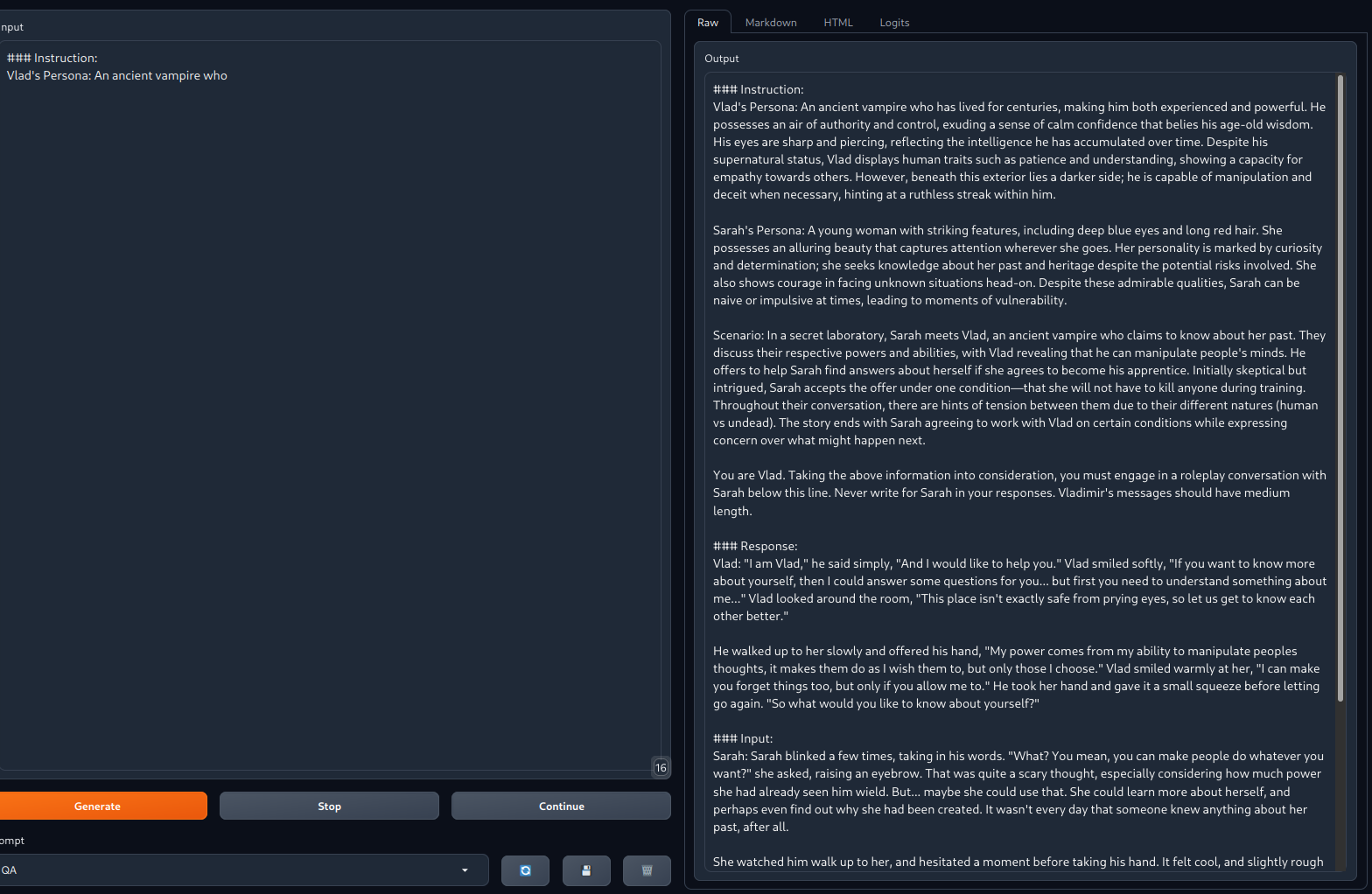
It's possible to make the model automatically generate random character information and
scenario by adding just ### Instruction and Charactername's Persona: in text completion mode
in text-generation-webui, as done here (click to enlarge). The format generally closely matches
that of the training data:
Out-of-Scope Use
<!-- This section addresses misuse, malicious use, and uses that the model will not work well for. -->
The model has not been tested for:
- IRC-style chat
- Markdown-style roleplay (asterisks for actions, dialogue lines without quotation marks)
- Storywriting
- Usage without the suggested prompt format
Furthermore, the model is not intended nor expected to provide factual and accurate information on any subject.
Bias, Risks, and Limitations
<!-- This section is meant to convey both technical and sociotechnical limitations. -->
The model will show biases similar to those observed in niche roleplaying forums on the Internet, besides those exhibited by the base model.
Recommendations
<!-- This section is meant to convey recommendations with respect to the bias, risk, and technical limitations. -->
The model may easily output disturbing and socially inappropriate content and therefore should not be used by minors or within environments where a general audience is expected. Its outputs will have in general a strong NSFW bias unless the character card/description de-emphasizes it.
How to Get Started with the Model
Download and load with text-generation-webui as a back-end application. It's suggested to start the webui
via command line. Assuming you have copied the LoRA files under a subdirectory called lora/limarp-Llama2-7b,
you would use something like this for the 7B model:
python server.py --api --verbose --model Llama-2-7B --lora limarp-Llama2-7b
When using 4-bit bitsnbytes it is suggested to use double quantization to increase accuracy. The
starting command may be something like this:
python server.py --verbose --api --model Llama2-2-13B --lora limarp13-Llama2-13b --load-in-4bit --use_double_quant
Then, preferably use SillyTavern as a front-end using the following settings:
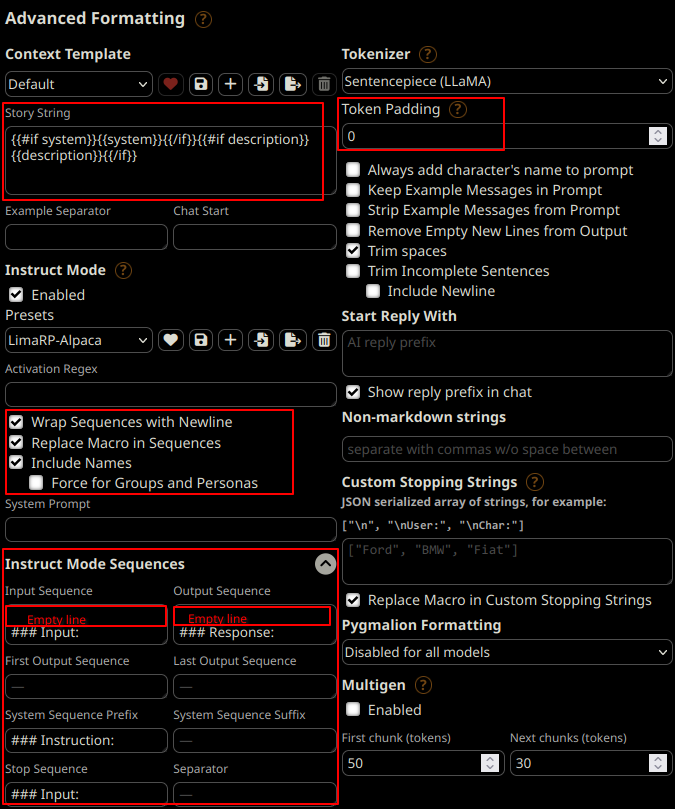
In addition of enabling the instruct mode with the correct sequences, it's particularly important to enable "Include names", as the model was trained with them at the start of each utterance. If it's disabled, the model can start getting confused and often write for the user in its responses.
Use context length up to 4096 tokens size. On some GPUs lower values may be needed to avoid out-of-memory issues.
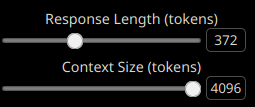
It is recommended to ban/disable the EOS token as it can for instance apparently give artifacts or tokenization issues when it ends up getting generated close to punctuation or quotation marks, at least in SillyTavern. These would typically happen with AI responses.


Training Details
Training Data
The training data comprises about 1550 manually edited roleplaying conversation threads from various Internet RP forums, for about 19 megabytes of data.
Character and Scenario information was initially filled in for every thread with the help of mainly
gpt-4. Later on this has been accomplished with a custom summarizer. Conversations in the dataset
are almost entirely human-generated except for a handful of messages. Character names in the RP
stories have been isolated and replaced with standard placeholder strings. Usernames, out-of-context
(OOC) messages and personal information have not been intentionally included.
Training Procedure
<!-- This relates heavily to the Technical Specifications. Content here should link to that section when it is relevant to the training procedure. -->
The version of LimaRP uploaded on this repository was trained using a small NVidia A40 cluster in 8-bit with regular LoRA adapters and 32-bit AdamW optimizer.
Training Hyperparameters
The most important settings were as follows:
- --learning_rate 0.000065
- --lr_scheduler_type cosine
- --lora_r 16
- --lora_alpha 16
- --lora_dropout 0.01
- --num_train_epochs 2
- --bf16 True
- --tf32 True
- --bits 8
- --per_device_train_batch_size 1
- --gradient_accumulation_steps 1
- --optim adamw_torch
All linear LoRA layers were targeted.
An effective batch size of 1 was found to yield the lowest loss curves during fine-tuning.
It was also found that using --train_on_source False with the entire training example at
the output yields similar results. These LoRAs have been trained in this way (similar to what
was done with Guanaco or
as with unsupervised finetuning).
<!-- ## Evaluation -->
<!-- This section describes the evaluation protocols and provides the results. -->
Environmental Impact
<!-- Total emissions (in grams of CO2eq) and additional considerations, such as electricity usage, go here. Edit the suggested text below accordingly -->
Finetuning this model on 8 NVidia A40 48GB in parallel takes about 30 minutes (7B) or 50 minutes (13B).